Showing posts with label RSL. Show all posts
Wednesday, October 16, 2013
meShaderEd.py (0.3.3): setup output parameters as AOV
Tuesday, April 16, 2013
meShaderEd.py (0.3.0)
https://github.com/ymesh/meShaderEd
download v0.3.0
SwatchNode
Added SwatchNode for image preview in shading networkSunday, April 7, 2013
meShaderEd.py (0.2.9)
https://github.com/ymesh/meShaderEd
download v0.2.9
Some new features were added.
TextParam widget.
Actions:
- select all nodes (Cmd+A)
- select nodes below in hierarchy (Cmd+Dn)
- select nodes above in hierarchy (Cmd+Up)
- duplicate nodes (Cmd+D) (without connections yet)
Store Recent Networks in File menu
Store Recent Projects in File menu
Saving project description file 'meshadered.prj' in project root
Added new nodes to Library from DRL
The most noticable in UI are:
download v0.2.9
Some new features were added.
TextParam widget.
Actions:
- select all nodes (Cmd+A)
- select nodes below in hierarchy (Cmd+Dn)
- select nodes above in hierarchy (Cmd+Up)
- duplicate nodes (Cmd+D) (without connections yet)
Store Recent Networks in File menu
Store Recent Projects in File menu
Saving project description file 'meshadered.prj' in project root
Added new nodes to Library from DRL
The most noticable in UI are:
NoteNode
This node allows to write some explanation of your networks and control its appearance.ConnectorNode
This node helps to organize complex networks with long links.Sunday, January 20, 2013
meShaderEd.py (0.2.8)
https://github.com/ymesh/meShaderEd
download v0.2.8
Added small UI enhancements (snap to grid, shadow and curved links for GfxNode).
Also, few texture nodes were added to Library (analogs of some useful Slim nodes) and a bunch of very interesting nodes from DRL (aka Lex Darlog). Thanks, Lex!
And very annoying bug with lost links after saving was fixed. (I hope)

download v0.2.8
Added small UI enhancements (snap to grid, shadow and curved links for GfxNode).
Also, few texture nodes were added to Library (analogs of some useful Slim nodes) and a bunch of very interesting nodes from DRL (aka Lex Darlog). Thanks, Lex!
And very annoying bug with lost links after saving was fixed. (I hope)

Monday, October 29, 2012
meShaderEd.py (0.2.7)
https://github.com/ymesh/meShaderEd
download v0.2.7
Format of root RSL nodes was changed, hence previous shader networks needs to replace those nodes.
ProjectSetup: Using relative pathes for resource directories.
ImageView: Auto update checkbox.
ImageView: Reset zoom button.
NodeEditorWindow: replaced by NodeEditorPanel (though it is not fully functional yet...)
Added support for LightSource rib node in BasicPrimitive2.
Here is screenshot with example of usage of these nodes:
Thursday, July 19, 2012
meShaderEd.py (0.2.5)
https://github.com/ymesh/meShaderEd
Root RSL nodes now have rib output instead of just shader name.
Some preview nodes removed.
Added icons in node description window.
Added ReadArchive node.Root RSL nodes now have rib output instead of just shader name.
Some preview nodes removed.
Sunday, May 27, 2012
meShaderEd.py (0.2.0)
https://github.com/ymesh/meShaderEd
The RenderMan Shader Editor supports all Renderman compliant renderers and shader compilers, that are accessible by PATH environment variable in your system.
Monday, August 16, 2010
meBakeRadiosity.slim
This Slim template implements bake_radiosity surface shader that was described in Pixar's RenderMan Application Notes - Point-Based Approximate Ambient Occlusion and Color Bleeding - 3.1 Baking a point cloud with area and radiosity data.
meBake.slim
meBakeAreas.slim
This Slim template implements bake_areas surface shader that was described in Pixar's RenderMan Application Notes - Point-Based Approximate Ambient Occlusion and Color Bleeding - 2.1 Baking a point cloud with area data.
Theresn't any separate standart template (at least in Slim 7.1 from RMS 1.0.1) for baking areas pointclouds using in Point-Based shading. Only if you are using shading components in conjunction with Environment light where this functionality is hidden under the hood.
See DiffuseEffects->ObjectCalculation->Approximated...
But this is more complicated method as for me...
meBake.slim
Theresn't any separate standart template (at least in Slim 7.1 from RMS 1.0.1) for baking areas pointclouds using in Point-Based shading. Only if you are using shading components in conjunction with Environment light where this functionality is hidden under the hood.
See DiffuseEffects->ObjectCalculation->Approximated...
But this is more complicated method as for me...
Sunday, August 8, 2010
meIndirect.slim
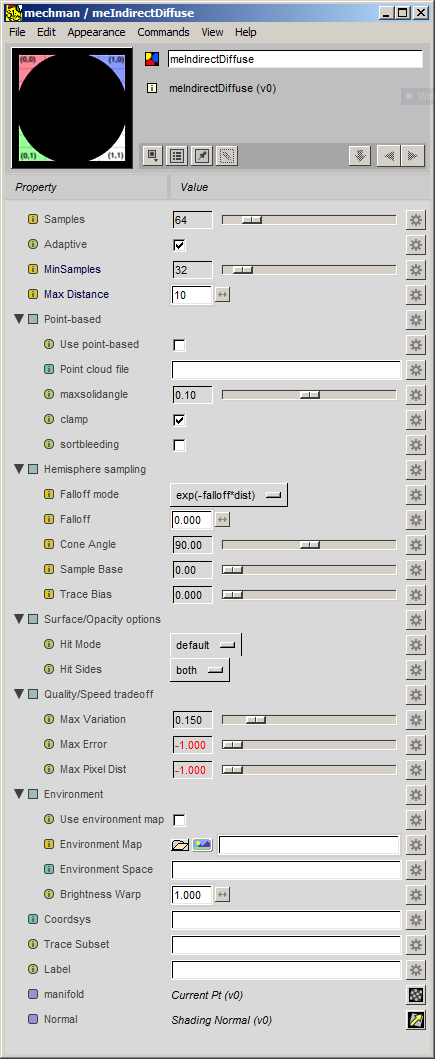
The Slim template meIndirectDiffuse, as meOcclusion.slim, is just a realization of standart RSL function indirectdiffuse with full set of available parameters. Its Slim's analog — IndirectIllum has slightly less parameters for control.
meIndirect.slim
meUtil.h
meIndirect.slim
meUtil.h
meEnsemble.slim
Slim's Ensembles and EnsembleAdaptors are very powerful features for control shader connections and attributes. But everything can be enhanced a bit ; ) meEnsemble allows more flexible operate with desired RiAttributes attached to shaders and Maya's geometry.
meEnsemble.slim
meEnsemble_UI.slim
meAddAttribute_UI.slim
meEnsemble.slim
meEnsemble_UI.slim
meAddAttribute_UI.slim
meCombineAOV.slim
After some experimenting with Slim's Shading Components, I've realized that may be this is great innovation in shader networks design with AOV (Arbitrary Output Variables), but not for me... I prefer to connect only simple (with one output) components to my own AOV instead of keeping a bunch of unused outputs through all shading network. meCombineAOV is now my everyday solution while working in Slim.
meCombineAOV.slim
meCombineAOV_UI.slim
meCombineAOV.slim
meCombineAOV_UI.slim
meOcclusion.slim
When first time I saw the Occlusion tempale in Slim, I was wonder, how few parameters it has, compares to parameters list for RSL occlussion function from PRman User Guide. Certainly, I agree that common Slim user may not need all of them, but what to do if You are advanced user? Right. Write your own template. Here is mine:
meOclussion.slim
For using it, you also need:
meUtil.h
meOclussion.slim
For using it, you also need:
meUtil.h
Subscribe to:
Posts (Atom)